SIEM and Data Platforms
Sysdig supports:
- Standard event forwarding
- Agent local forwarding
Supported Data Types
Standard event forwarding and agent local forwarding support different data types.
| Supported Data Types | Standard | Agent Local | Notes |
|---|---|---|---|
| Runtime Policy Events | ✅ | ✅ | Available in agent local forwarding only if generated by the agent. For details, see Agent Local Forwarding. |
| Activity Audit | ✅ | ✅ | All Activity Audit data is available for agent local forwarding except kube activities. |
| Sysdig Platform Audit | ✅ | ||
| Monitor Events | ✅ | If Sysdig Monitor is installed |
Data Types per Integration
This table shows the data types that each integration supports. For standard forwarding, these are the data types you can select in a forwarding rule. The available list also depends on the Sysdig features and products you have enabled.
Agent local forwarding supports only Runtime Policy Events and Activity Audit, and not Activity Audit for Google Chronicle, Google Security Command Center, and IBM MCM. For details, see Supported Data Types.
| Integration | Agent local type | Runtime Policy Events | Activity Audit | Sysdig Platform Audit | Monitor Events |
|---|---|---|---|---|---|
| Amazon Kinesis Data Streams | KINESIS_DATA_STREAMS | ✅ | ✅ | ✅ | ✅ |
| Amazon Kinesis Firehose | KINESIS_FIREHOSE | ✅ | ✅ | ✅ | ✅ |
| Amazon SQS | SQS | ✅ | ✅ | ✅ | ✅ |
| Elasticsearch | ELASTIC | ✅ | ✅ | ✅ | ✅ |
| Google Pub/Sub | PUBSUB | ✅ | ✅ | ✅ | ✅ |
| Kafka Topic | KAFKA | ✅ | ✅ | ✅ | ✅ |
| Microsoft Sentinel | SENTINEL | ✅ | ✅ | ✅ | ✅ |
| Splunk | SPLUNK | ✅ | ✅ | ✅ | ✅ |
| Syslog | SYSLOG | ✅ | ✅ | ✅ | ✅ |
| Webhook (including Cribl) | WEBHOOK | ✅ | ✅ | ✅ | ✅ |
| Google Chronicle | CHRONICLE | ✅ | ✅ | ✅ | ❌ |
| IBM QRadar | QRADAR | ✅ | ✅ | ✅ | ❌ |
| Google Security Command Center | SCC | ✅ | ❌ | ❌ | ❌ |
| IBM MCM | MCM | ✅ | ❌ | ❌ | ❌ |
Standard Event Forwarding
You can use the Sysdig Secure UI to configure event forwarding to designated third-party systems, including open-ended integrations using Webhook or Syslog. These integrations pass the data through the Sysdig backend and forward to external systems using applicable APIs.
Prerequisites
You must be logged in to Sysdig Secure as an Administrator to access the event forwarding options.
Add Standard Integrations
Log in to Sysdig Secure as an Admin.
Select Integrations > SIEM & Data Platforms.
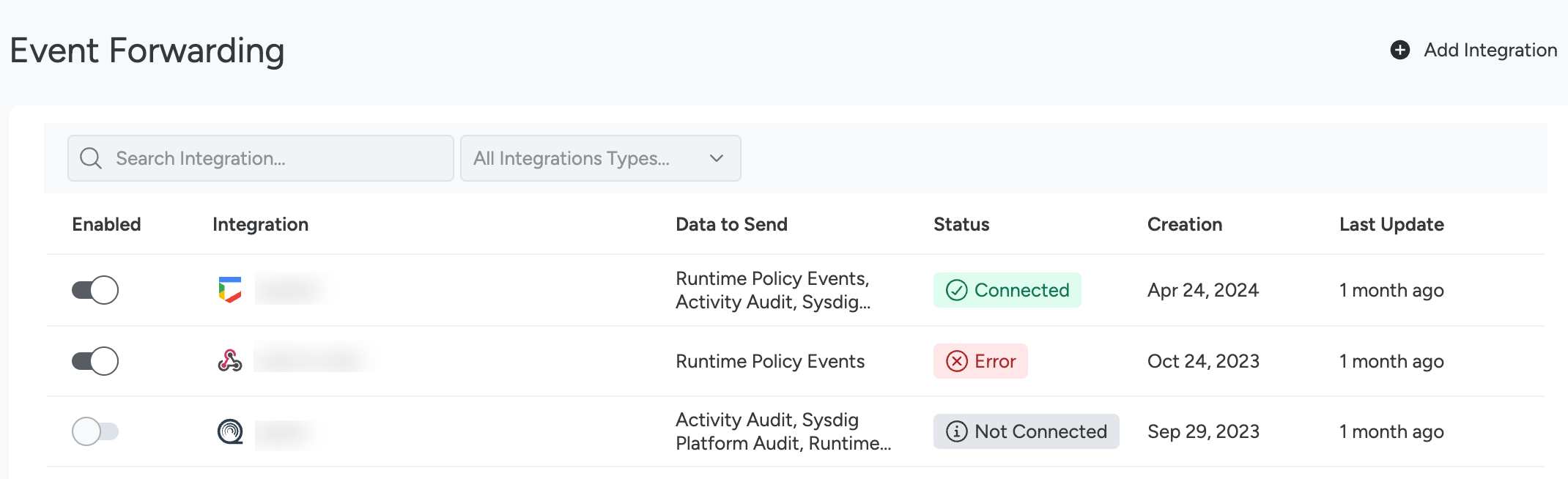
Click +Add Integration.
Choose a listed integration, or Syslog or Webhook.
Complete the relevant integration fields in UI.
Select Save.
Add forwarding rules to choose which data the integration forwards.
Configure Forwarding Rules
Forwarding rules define which Sysdig data an integration forwards. Each rule selects one data type and can narrow it down with filters. An integration can have multiple rules, for example, one that forwards only high-severity runtime policy events and another that forwards all Activity Audit data.
An integration forwards no data until it has at least one forwarding rule. Forwarding rules replace the Data to Send field. In regions where forwarding rules are not yet available, the integration form still shows Data to Send.
Add a Forwarding Rule
Log in to Sysdig Secure as an Admin.
Select Integrations > SIEM & Data Platforms.
Select the integration to add the rule to.
The Forwarding Rules panel on the integration detail page lists the existing rules with their name, data type, and the date they were added. You can add rules only after the integration is saved.
Select Add Forwarding Rule.
Enter a Rule Name.
Select a Data Type. For the data types each integration supports, see Data Types per Integration.
(Optional) Under Filters, add one or more conditions to forward only the matching data. For the available fields, see Available Filters. Without filters, the rule forwards all data of the selected type.
Select Save.
The Rules column in the integrations list shows how many rules each integration has. Hover over the count to see the rule names.
Available Filters
Filters depend on the data type. Each filter is a condition made of a field, an operator, and one or more values. The Filters section groups the fields as Suggested Filters and Fields & Labels.
| Data Type | Filterable fields |
|---|---|
| Runtime Policy Events | Severity (High, Medium, Low, Info), Source (the event source of the runtime rule, such as Syscall or K8s Audit), Name (the policy name), Rule Name, event fields, and labels such as Kubernetes or cloud labels |
| Activity Audit | Type (Command, Connection, Kubernetes, File Access) |
| Sysdig Platform Audit | No filters. The rule forwards all data of this type. |
| Monitor Events | No filters. The rule forwards all data of this type. |
Edit or Delete a Forwarding Rule
Open the integration detail page.
In the Forwarding Rules panel, open the actions menu of the rule and select Edit Rule or Delete Rule.
To confirm a deletion, select Yes, delete.
Review Integration Status
To review the status of integrations:
Log in to Sysdig Secure.
Select Integrations > SIEM & Data Platforms.
In the Status column, you will see one of the possible statuses:
- Connected: The integration is successful. No errors have been found in the last 24 hours.
- Not Connected: The integration has not been set up yet.
- Warning: The integration has had issues in the last 24 hours and the delivery of at least a message was retried.
- Error: When a message delivery fails after three attempts, the integration status appears as Error and the integration is inhibited for the next five minutes. This ensures the integration does not flood the receiver side with messages.
To review an integration’s status in more detail:
Select an integration with a Warning or Error status.
The integration detail page opens.
Review the history under the Status section. Here, you can find out when and why the integrations status changed.
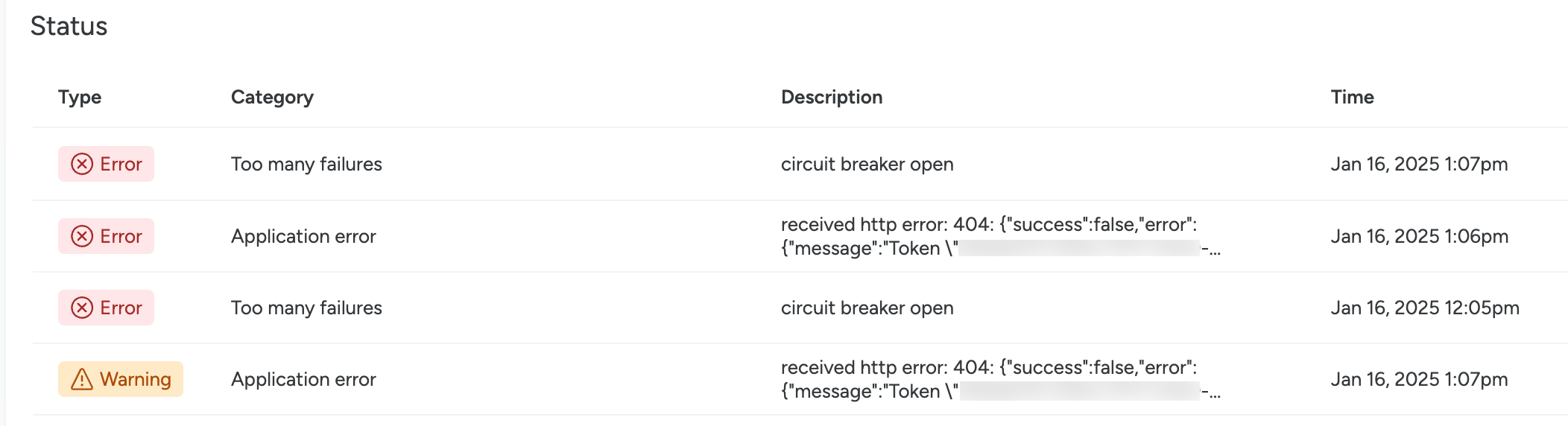
This may be due to an application error, or too many message delivery failures.
Delete Standard Integrations
To delete an existing integration:
Log in to Sysdig Secure as Admin.
Select Integrations > SIEM & Data Platforms.
Select the three-dot icon beside an integration.
Select Delete Integration.
Deleting an integration also deletes its forwarding rules.
To confirm, select Yes, delete.
Agent Local Forwarding
With agent v.12.18.0+, you can forward data directly from the Sysdig agent. With this method, the data reaches the target platform without passing through the Sysdig backend. This avoids exposing your SIEM to the internet.
By default, on-premises Sysdig blocks attempts to forward events to RFC1918 addresses. To modify this behavior, edit the config-map sysdigcloud-events-forwarder-config and modify the eventsforwarder.addressBlocklist as needed. Then, restart the sysdigcloud-events-forwarder-api and sysdigcloud-events-forwarder deployments.
Key differences from the standard event forwarding option:
- The local forwarder does not support X.509 authentication.
- Some labels available might not be available as they are populated in a post-processing phase.
DescriptionandagentIdfields are not available.- Requires manual configuration of agent config files rather than UI entry fields.
- Only the events generated by the agent are available:
- Workload events (Container Drift, List Matching, Malware and Workload policies/rules)
- Kubernetes audit, if installed with the AuditLog setup
Configure Agent Local Forwarding
For the data types that agent local forwarding supports, see Supported Data Types.
Enable the Forwarder
Edit the agent values.yaml (Helm) or dragent.yaml (non-Helm) to contain the settings to enable the forwarder and to define what data to send to it:
For values.yaml (Helm)
localForwarder:
  enabled: true
  transmitMessageTypes:
   - POLICY_EVENTS
   - SECURE_AUDIT
For dragent.yaml (non-Helm)
local_forwarder:
  enabled: true
  transmit_message_types:
   - POLICY_EVENTS
   - SECURE_AUDIT
Message_types can be either or both options.
Configure the Target Parameters
Add the configuration details for a selected integration.
- Helm: If you are using Helm, add to your
values.yamlfile under theIntegrationsconfig parameter. - Non-Helm: If you are not using Helm, then add the configuration details in another file located in the same directory as the
dragent.yaml:local_forwarder_config.yaml.
The integration entries for each type follow this sample format:
integrations:
- type: SPLUNK
  channels:
  - SECURE_EVENTS_POLICIES
  - ACTIVITY_AUDIT
  configuration:
    Index: indexname
    ServiceToken: ***
    ServiceURL: "https://yoursplunkurl.com"
Check the Agent Local Forwarding section on each subpage for the details of that type. For example, see Splunk.
Reference: JSON Formats Used per Data Source
This section is for reference only. In most cases, there is no need to change the default format.
Policy Event Payload
Policy Event Severity
The severity field in the payload is an integer. The following table shows different values event severities can have.
| Event Severity | JSON severity value |
|---|---|
| High | 0, 1, 2, 3 |
| Medium | 4, 5 |
| Low | 6 |
| Info | 7 |
There are two formats supported. See the Runtime Policy Events in JSON Format . The Legacy format has been deprecated as of Jan 18, 2024. See Data Types for Events Forwarding.
To learn about Sysdig Monitor event severity levels, see Severity and Status.
Runtime Policy Events Payload
{
    "id": "164ace360cc3cfbc26ec22d61b439500",
    "type": "policy",
    "timestamp": 1606322948648718268,
    "timestampRFC3339Nano": "2020-11-25T16:49:08.648718268Z",
    "originator": "policy",
    "category": "runtime",
    "source": "syscall",
    "rawEventOriginator": "linuxAgent",
    "rawEventCategory": "runtime",
    "sourceDetails": {
      "sourceType": "workload",
      "sourceSubType": "host"
    },
    "engine": "falco",
    "name": "Notable Filesystem Changes",
    "description": "Identified notable filesystem activity that might change sensitive/important files. This differs from Suspicious Filesystem Changes in that it looks more broadly at filesystem activity, and might have more false positives as a result.",
    "severity": 0,
    "agentId": 13530,
    "containerId": "",
    "machineId": "08:00:27:54:f3:9d",
    "actions": [
        {
          "type": "POLICY_ACTION_CAPTURE",
          "successful": true,
          "token": "abffffdd-fba8-42c7-b922-85364b00eeeb",
          "afterEventNs": 5000000000,
          "beforeEventNs": 5000000000
        }
    ],
    "content": {
        "policyId": 544,
        "baselineId": "",
        "ruleName": "Write below etc",
        "ruleType": "RULE_TYPE_FALCO",
        "ruleTags": [
            "NIST_800-190",
            "NIST_800-53",
            "ISO",
            "NIST_800-53_CA-9",
            "NIST_800-53_SC-4",
            "NIST",
            "ISO_27001",
            "MITRE_T1552_unsecured_credentials",
            "MITRE_T1552.001_credentials_in_files"
        ],
        "output": "File below /etc opened for writing (user=root command=touch /etc/ard parent=bash pcmdline=bash file=/etc/ard program=touch gparent=su ggparent=sudo gggparent=bash container_id=host image=<NA>)",
        "fields": {
            "container.id": "host",
            "container.image.repository": "<NA>",
            "falco.rule": "Write below etc",
            "fd.directory": "/etc/pam.d",
            "fd.name": "/etc/ard",
            "group.gid": "8589935592",
            "group.name": "sysdig",
            "proc.aname[2]": "su",
            "proc.aname[3]": "sudo",
            "proc.aname[4]": "bash",
            "proc.cmdline": "touch /etc/ard",
            "proc.name": "touch",
            "proc.pcmdline": "bash",
            "proc.pname": "bash",
            "user.name": "root"
        },
        "falsePositive": false,
        "matchedOnDefault": false,
        "policyVersion": 2,
        "policyOrigin": "Sysdig"
    },
    "labels": {
        "host.hostName": "ardbox",
        "process.name": "touch /etc/ard"
    }
}
Activity Audit Forwarding Payloads
Each of the activity audit types has its own JSON format.
Command (cmd) Payload
{
    "id": "164806c17885b5615ba513135ea13d79",
    "agentId": 32212,
    "cmdline": "calico-node -felix-ready -bird-ready",
    "comm": "calico-node",
    "pcomm": "apt-get",
    "containerId": "a407fb17332b",
    "count": 1,
    "customerId": 1,
    "cwd": "/",
    "hostname": "qa-k8smetrics",
    "loginShellDistance": 0,
    "loginShellId": 0,
    "pid": 29278,
    "ppid": 29275,
    "procExepath": "/usr/bin/calico-node",
    "rxTimestamp": 1606322949537513500,
    "timestamp": 1606322948648718268,
    "timestampRFC3339Nano": "2020-11-25T16:49:08.648718268Z",
    "tty": 34816,
    "type": "command",
    "uid": 0,
    "username": "root",
    "userLoginUid": 4294967295,
    "userLoginName": "<NA>",
    "labels": {
        "aws.accountId": "059797578166",
        "aws.instanceId": "i-053b1f0509fdbc15a",
        "aws.region": "us-east-1",
        "container.image.digest": "sha256:26c68657ccce2cb0a31b330cb0be2b5e108d467f641c62e13ab40cbec258c68d",
        "container.image.id": "d2e4e1f51132",
        "container.label.io.kubernetes.pod.namespace": "default",
        "container.name": "bash",
        "host.hostName": "ip-172-20-46-221",
        "host.mac": "12:9f:a1:c9:76:87",
        "kubernetes.node.name": "ip-172-20-46-221.ec2.internal",
        "kubernetes.pod.name": "bash"
    }
}
Network (net) Payload
{
    "id": "164806f43b4d7e8c6708f40cdbb47838",
    "agentId": 32212,
    "clientIpv4": 2886795285,
    "clientIpv4Dot": "172.17.0.21",
    "clientPort": 60720,
    "comm": "kubectl",
    "containerId": "da3abd373c7a",
    "customerId": 1,
    "direction": "out",
    "dnsDomains": [
      "api.openai.com"
    ],
    "errorCode": 0,
    "hostname": "qa-k8smetrics",
    "l4protocol": 6,
    "pid": 2452,
    "processName": "kubectl",
    "rxTimestamp": 0,
    "serverIpv4": 174063617,
    "serverIpv4Dot": "10.96.0.1",
    "serverPort": 443,
    "timestamp": 1606322948648718268,
    "timestampRFC3339Nano": "2020-11-25T16:49:08.648718268Z",
    "type": "connection"
    "tty": 34816,
    "labels": {
        "aws.accountId": "059797578166",
        "aws.instanceId": "i-053b1f0509fdbc15a",
        "aws.region": "us-east-1",
        "container.image.digest": "sha256:26c68657ccce2cb0a31b330cb0be2b5e108d467f641c62e13ab40cbec258c68d",
        "container.image.id": "d2e4e1f51132",
        "host.hostName": "ip-172-20-46-221",
        "host.mac": "12:9f:a1:c9:76:87",
        "kubernetes.cluster.name": "k8s-onprem",
        "kubernetes.namespace.name": "default",
        "kubernetes.node.name": "ip-172-20-46-221.ec2.internal",
        "kubernetes.pod.name": "bash"
    }
}
File (file) Payload
{
    "id": "164806c161a5dd221c4ee79d6b5dd1ce",
    "agentId": 32212,
    "containerId": "a407fb17332b",
    "directory": "/var/lib/dpkg/updates/",
    "filename": "tmp.i",
    "hostname": "qa-k8smetrics",
    "permissions": "w",
    "pid": 414661,
    "comm": "dpkg",
    "timestamp": 1606322948648718268,
    "timestampRFC3339Nano": "2020-11-25T16:49:08.648718268Z",
    "type": "fileaccess",
    "labels": {
        "aws.accountId": "059797578166",
        "aws.instanceId": "i-053b1f0509fdbc15a",
        "aws.region": "us-east-1",
        "container.image.digest": "sha256:26c68657ccce2cb0a31b330cb0be2b5e108d467f641c62e13ab40cbec258c68d",
        "container.image.id": "d2e4e1f51132",
        "container.image.repo": "docker.io/library/ubuntu",
        "container.name": "bash",
        "host.hostName": "ip-172-20-46-221",
        "host.mac": "12:9f:a1:c9:76:87",
        "kubernetes.cluster.name": "k8s-onprem",
        "kubernetes.namespace.name": "default",
        "kubernetes.node.name": "ip-172-20-46-221.ec2.internal",
        "kubernetes.pod.name": "bash"
    }
}
Kubernetes (kube exec) Payload
{
    "id": "164806f4c47ad9101117d87f8b574ecf",
    "agentId": 32212,
    "args": {
        "command": "bash",
        "container": "nginx"
    },
    "auditId": "c474d1de-c764-445a-8142-a0142505868e",
    "containerId": "397be1762fba",
    "hostname": "qa-k8smetrics",
    "name": "nginx-76f9cf7469-k5kf7",
    "namespace": "nginx",
    "resource": "pods",
    "sourceAddresses": [
        "172.17.0.21"
    ],
    "stages": {
        "started": 1605540915526159000,
        "completed": 1605540915660084000
    },
    "subResource": "exec",
    "timestamp": 1606322948648718268,
    "timestampRFC3339Nano": "2020-11-25T16:49:08.648718268Z",
    "type": "kubernetes",
    "user": {
        "username": "system:serviceaccount:default:default-kubectl-trigger",
        "groups": [
            "system:serviceaccounts",
            "system:serviceaccounts:default",
            "system:authenticated"
        ]
    },
    "userAgent": "kubectl/v1.16.2 (linux/amd64) kubernetes/c97fe50",
    "labels": {
        "agent.tag.cluster": "k8s-onprem",
        "agent.tag.sysdig_secure.enabled": "true",
        "container.image.repo": "docker.io/library/nginx",
        "container.image.tag": "1.21.6",
        "container.label.io.kubernetes.container.name": "nginx",
        "container.label.io.kubernetes.pod.name": "nginx-76f9cf7469-k5kf7",
        "container.label.io.kubernetes.pod.namespace": "nginx",
        "container.name": "nginx",
        "host.hostName": "qa-k8smetrics",
        "host.mac": "12:09:c7:7d:8b:25",
        "kubernetes.cluster.name": "demo-env-prom",
        "kubernetes.deployment.name": "nginx-deployment",
        "kubernetes.namespace.name": "nginx",
        "kubernetes.pod.name": "nginx-76f9cf7469-k5kf7",
        "kubernetes.replicaSet.name": "nginx-deployment-5677bff5b7"
    }
}
Sysdig Platform Audit Payload
{
    "id": "16f43920a0d70f005f136173fcec3375",
    "type": "audittrail",
    "timestamp": 1606322948648718268,
    "timestampRFC3339Nano": "2020-11-25T16:49:08.648718268Z",
    "originator": "ingestion",
    "category": "",
    "source": "auditTrail",
    "name": "",
    "description": "",
    "severity": 0,
    "agentId": 0,
    "containerId": "",
    "machineId": "",
    "content": {
        "timestampNs": 1654009775452000000,
        "customerId": 1,
        "userId": 454926,
        "teamId": 46902,
        "requestMethod": "GET",
        "requestUri": "/api/integrations/discovery/",
        "userOriginIP": "187.188.243.122",
        "queryString": "cluster=demo-env-prom&namespace=sysdig-agent",
        "responseStatusCode": 200,
        "entityType": "integration",
        "entityPayload": ""
    },
    "labels": {
        "entityType": "integration"
    }
}
