Validated Network Exposure
Overview
Network Exposure identifies resources that are reachable from the internet by analyzing your cloud network configuration, including security groups, firewall rules, routing tables and open ports. This configuration analysis models which resources could be reached, but it does not confirm that a live service is answering on the open port or identify what is running behind it.
Validated Network Exposure adds active confirmation on top of that modeled view. For each resource that Network Exposure flags as reachable, Sysdig probes the endpoint to verify that a service is responding, identifies the application running on it and determines whether the service requires authentication. This gives you a confirmed, application-aware view of your external attack surface, so you can prioritize endpoints that are genuinely open rather than paths that the network configuration permits but that no service answers.
The distinction between modeled and validated exposure is reflected in the exposure status of a resource:
- Exposed: The resource is reachable from the internet based on network configuration analysis. This status is modeled and is not validated through port scanning.
- Publicly Exposed: The resource has been confirmed reachable through active port scanning.
For how these statuses appear in your Inventory, see Exposure Status Icons.
Validation Capabilities
Validated Network Exposure enriches each modeled exposure with three capabilities.
Active Reachability Validation
Confirms that a live service is responding on the open port, rather than relying on the network configuration alone. This separates genuinely reachable services from configuration paths that no service answers.
Application Fingerprinting
Identifies the application running on the endpoint, and its version when available, so you can distinguish a generic open port from a specific service such as a database or a CI tool. Each fingerprint includes a confidence level.
Authentication Detection
Classifies each endpoint by whether it requires authentication, so you can distinguish a login-gated service from one that is genuinely open and prioritize unprotected exposures first. Each endpoint is labeled Authenticated, Likely Authenticated, Likely Unauthenticated, Unauthenticated or Unknown Auth, where a Likely qualifier indicates a lower-confidence result.
Note: When the probe cannot determine the application or the authentication state, the endpoint is reported with an unknown application or Unknown Auth state rather than omitted from the findings.
For a resource with multiple open ports, each detected application is listed with its own fingerprint, authentication status and confidence:
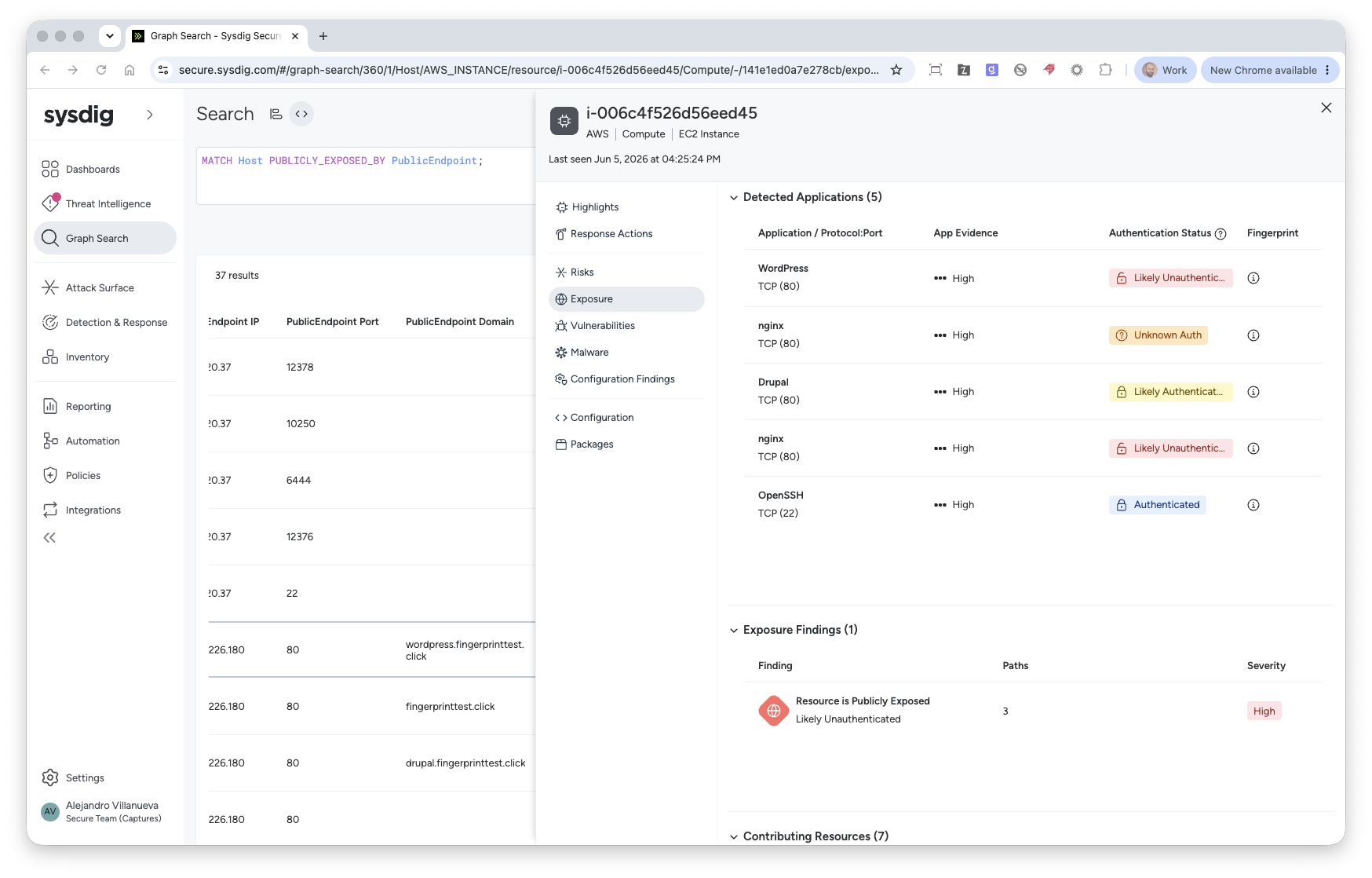
The application and authentication results, along with their confidence levels, are included in the validated exposure data for each resource. For the full field reference and an example, see Validated Exposure Information.
Supported Environments
| Category | Supported |
|---|---|
| Cloud providers | AWS, GCP, Azure |
| Resource types | Compute hosts |
| Protocols | TCP, UDP |
| IP versions | IPv4 |
Limitations
- Kubernetes workloads are not covered.
- Validation covers IPv4 endpoints only. IPv6 is not supported.
- Validation is scan-based and runs on a periodic cadence after Network Exposure computes the exposure paths. Results reflect the most recent scan rather than real-time state.
Enablement
Validated Network Exposure requires Network Exposure to be active. Sysdig enables Validated Network Exposure per tenant on request; there is no self-serve setting. To turn it on, contact your Sysdig representative or Sysdig Support. After it is enabled, validated results appear automatically as scans complete.
Active port scanning requires you to add Sysdig’s scanner IP addresses to your allow lists so that your security tooling does not block validation. For the setup steps and the IP ranges to allow, see Enable Validated Exposure for Advanced Network Exposure.
Validated Network Exposure is part of the existing Secure Cloud Security Posture Management (CSPM) and Attack Surface Management packaging, the same offering that includes Network Exposure. It does not require a separate subscription.
View Validated Exposure Results
You can review validated exposure for an individual resource or query validated endpoints across your infrastructure.
Review a Single Resource
In Resource 360, open the resource and select Exposure to see its validation results. The Exposure Validation panel summarizes the exposure finding, authentication state, the last validation time and the validated protocols and ports, alongside the network path that makes the resource reachable.
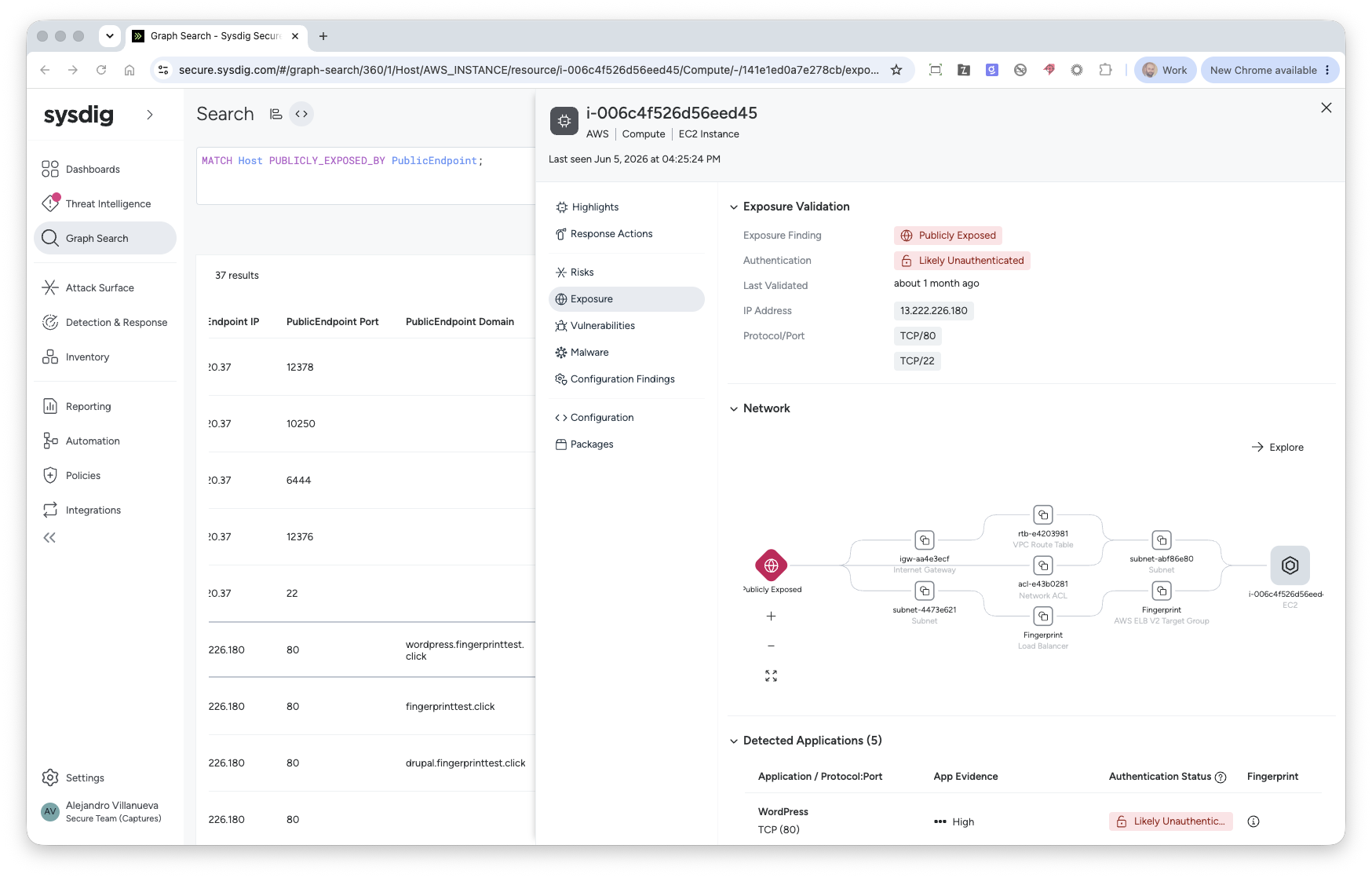
The same view lists every detected application and the contributing resources in the exposure path. For details on these sections, see Viewing Exposure Information in Inventory.
Query Validated Endpoints with Graph Search
To review validated endpoints across your infrastructure, use Graph Search with SysQL. The PUBLICLY_EXPOSED_BY relationship returns hosts that have validated exposure, along with each endpoint’s protocol, port, detected application, authentication status and confidence:
MATCH Host PUBLICLY_EXPOSED_BY PublicEndpoint;
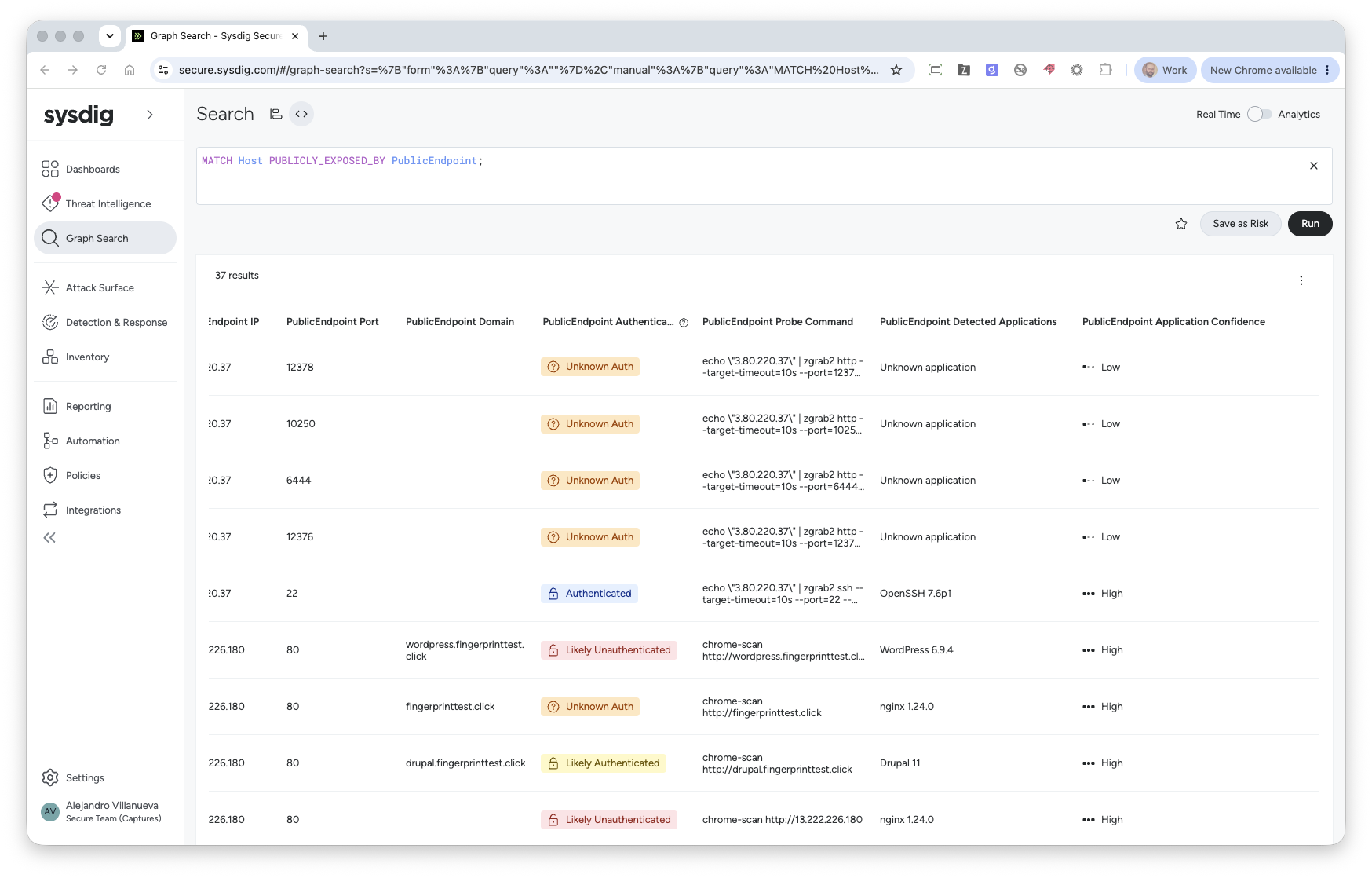
For more about SysQL syntax, see the SysQL Reference Library and Querying Exposure Results with Inventory Search.
