Advanced Network Exposure
Supported Cloud Providers
Advanced Network Exposure provides comprehensive coverage across major cloud platforms:
- AWS
- Azure
- GCP
- IBM Cloud
Exposure Validation
Advanced Network Exposure performs a configuration evaluation of your cloud resources. This evaluation assesses the resources and their configurations, which can expose them to the internet. After finding an exposure path that exposes a resource, a port scan is triggered to determine whether the endpoint is truly exposed.
Configuration-Based Analysis: Evaluates the complete network path by analyzing resource configurations, security groups, network ACLs, routing tables, internet gateways, load balancers and other network components to determine theoretical accessibility from the internet.
Port Scanning Validation: Performs network port scans to verify internet-exposed resources, validating the configuration analysis with real-world reachability tests. This ensures findings represent genuine exposure, not just permissive configurations that may be blocked by other network controls.
Service Fingerprinting: When scanned ports are discovered to be open, Advanced Network Exposure performs service fingerprinting to detect and identify the services running on those ports. This includes analyzing response headers, banners and service-specific protocol responses to determine the type of service (e.g., HTTP, HTTPS, SSH, databases), version information and other parts of your technology stack. This additional context helps assess the security implications of the exposed service.
Note: Port scanning validation and service fingerprinting require additional setup steps and must be explicitly enabled. Please contact Sysdig Support to activate these features. For detailed information about the prerequisites and activation process, see Enable Advanced Network Exposure.
Viewing Exposure Information in Inventory
Advanced Network Exposure provides intuitive visualization of exposure information directly within the Sysdig Secure Inventory, making it easy to identify exposed resources and understand their exposure paths.
Exposure Status Icons
When viewing resources in your Inventory, resources that can be analyzed for network exposure display an exposure status indicator on the right side of the resource listing:
- Not Exposed: Indicates that the resource is not accessible from the internet based on current network configurations and analyzed port scanning
- Exposed: Indicates that the resource has been identified as exposed to the internet through one or more network paths (Not validated with port scanning)
- Publicly Exposed: Indicates that the resource has been identified as exposed to the internet through one or more network paths (Validated with port scanning)

This visual indicator allows you to quickly identify which resources in your inventory are exposed without having to drill into each resource.
Accessing the Exposure Section
To view detailed exposure information for a specific resource:
- Navigate to Inventory in Sysdig Secure
- Select the resource you want to investigate
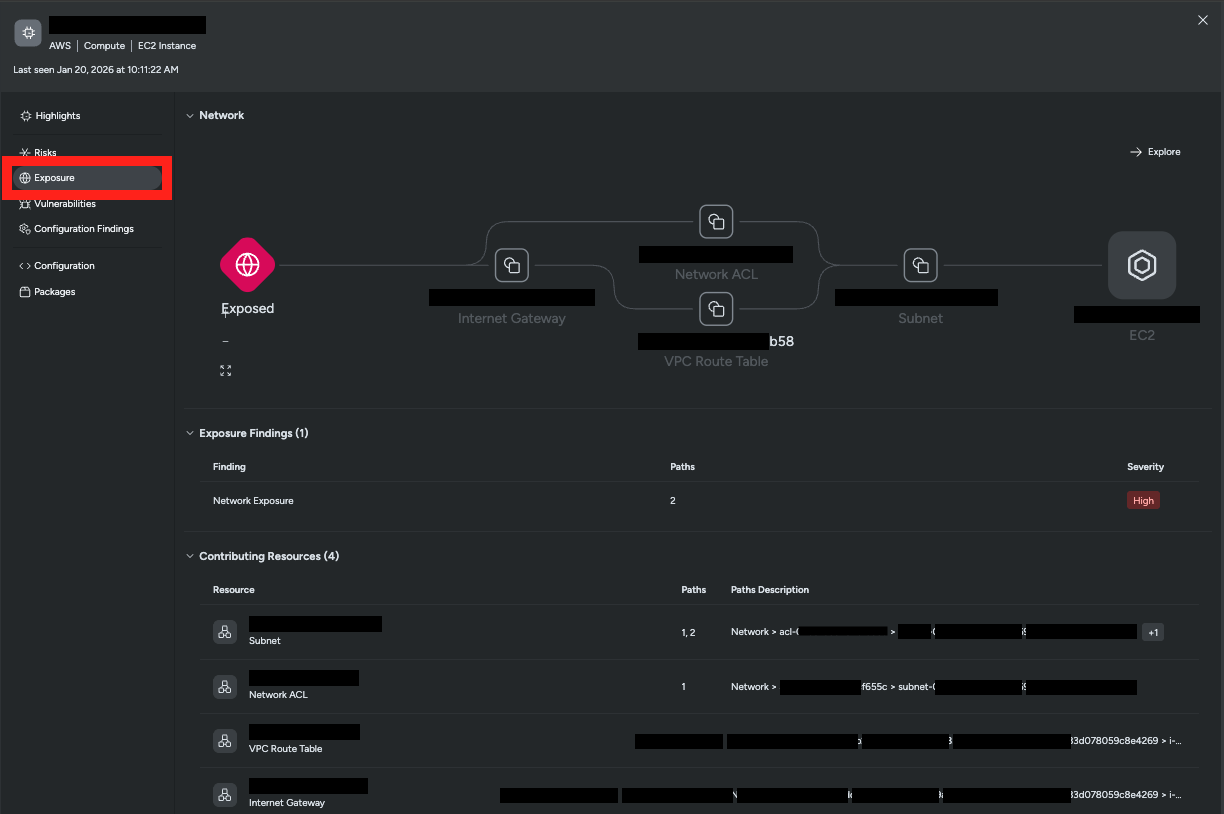
- In the resource detail panel, click on the Exposure section in the left sidebar
The Exposure section provides comprehensive information about the resource’s exposure status, including:
- Exposure Path Visualization: An interactive network diagram showing paths from the internet to your resource.
- Exposure Findings: List of specific paths through which the resource is exposed.
- Contributing Resources: Resources involved in the exposure path and the path to which they belong.
Exposure Findings
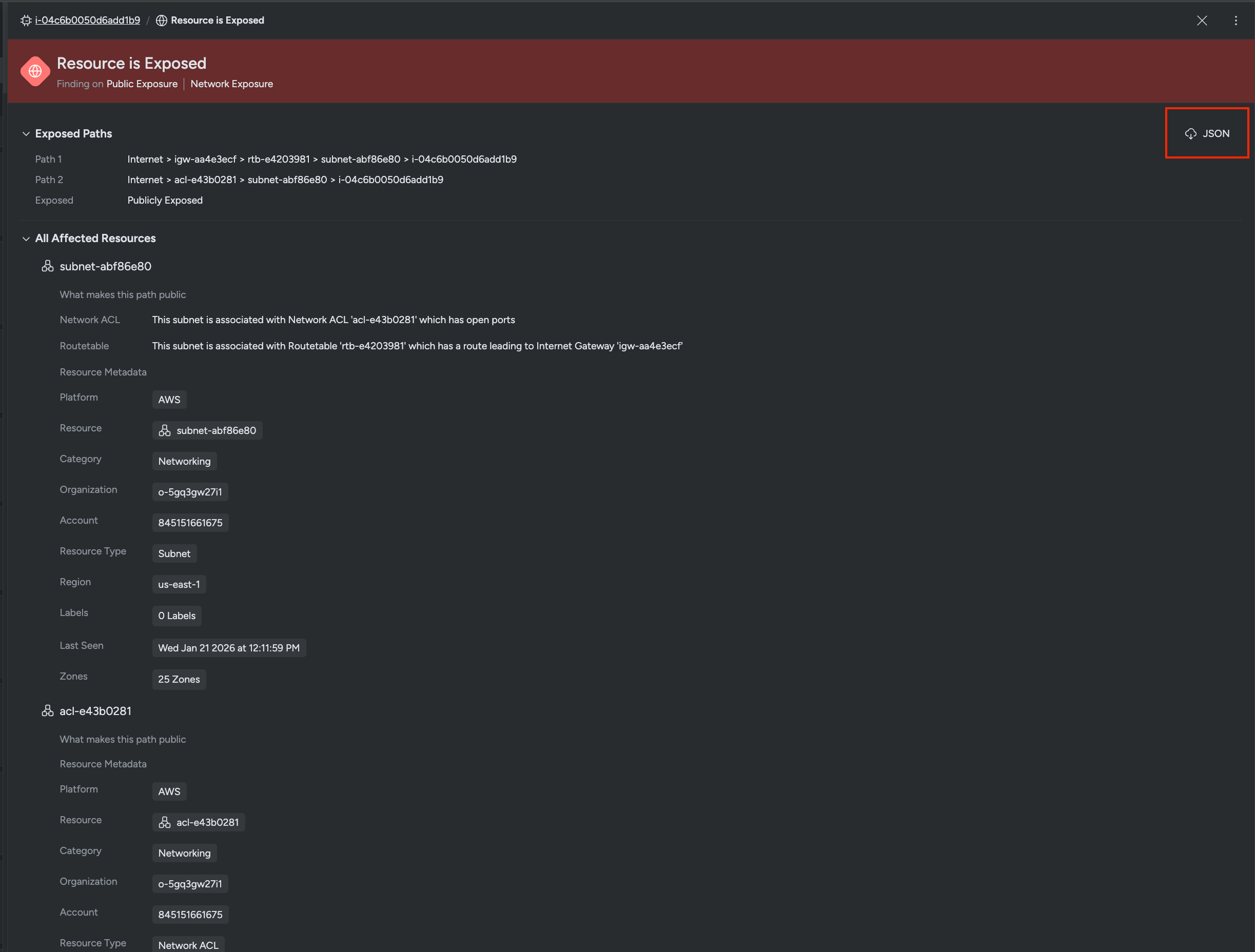
The Exposure Findings tab in the UI provides detailed information about why a resource is exposed and all the network components involved in the exposure paths.
Exposed Paths
This section displays all the paths that make the resource exposed to the internet. Each path shows the complete sequence of network components from the internet to your resource. Multiple paths may exist for a single resource, and all are listed to give you complete visibility into how the resource can be reached from the internet.
All Affected Resources
The “All Affected Resources” section provides details about every network component involved in the exposure paths. For each resource, you can view:
- Platform: The cloud provider (AWS, Azure, GCP, IBM Cloud)
- Resource Name: The resource’s identifier
- Category: The type of network component (Networking, Compute, etc.)
- Organization: The organization to which the resource belongs
- Account: The specific cloud account containing the resource
- Resource Type: The technical type of the resource
- Region: The geographical region where the resource is deployed
- Last Seen: When the resource was last scanned and analyzed
- Zones: The availability zones where the resource is located
This information helps you understand the complete context of your exposure and identify which accounts, regions and network components need attention.
Validated Exposure Information
When validated network exposure is activated, and a resource has been validated through port scanning and service fingerprinting, additional detailed information is included in the findings JSON data. This validated data provides concrete evidence of exposure and helps you understand exposed resources, exactly which services are accessible and what information they reveal about your infrastructure.
Example Validated Exposure JSON
Below is an example of the JSON data generated when validated network exposure detects and fingerprints an open port:
[
  {
    "scanDate": "2026-01-21T02:00:12.560Z",
    "protocol": "TCP",
    "ip": "<ip>",
    "port": 22,
    "domain": null,
    "authenticationStatus": 0,
    "authenticationConfidence": 2,
    "probeCommand": "<command to reach endpoints>",
    "applicationName": "OpenSSH",
    "applicationVersion": "8.9p1",
    "applicationConfidence": 2
  }
]
Understanding the Validated Exposure Data:
scanDate: Timestamp indicating when the port scan and service fingerprinting were performed.
protocol: Network protocol used for the scan (e.g., TCP, UDP), showing how the service communicates.
ip: The public IP address that was scanned and found to have an open port, confirming the resource is reachable from the internet.
port: The specific port number discovered to be open and accessible.
domain: Domain name associated with the IP address, if applicable. Null indicates no domain mapping was found.
authenticationStatus:
0: authenticated1: unauthenticated2: unknownauthenticationConfidence:
0: low1: mid2: highprobeCommand: The command used by the scanning infrastructure to probe and fingerprint the service. This shows the technical details of how the service was identified.
applicationName: The identified application or service running on the open port (e.g., “OpenSSH”, “nginx”, “Apache”, “MySQL”). This tells you which application is exposed.
applicationVersion: The specific version of the detected application.
applicationConfidence:
0: low1: mid2: high
Querying Exposure Results with Inventory Search
Beyond viewing exposure information for individual resources, you can use Inventory Search to query and analyze exposure validation results across your entire infrastructure. This search capability allows you to identify all publicly exposed endpoints and examine their port-scanning and service-fingerprinting data in a centralized view.
Accessing Inventory Search
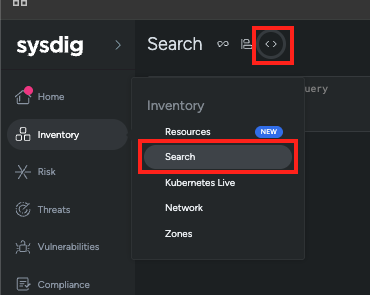
To access the Inventory Search feature:
- Navigate to Inventory in Sysdig Secure
- Click on the Search option in the top menu
Searching for Publicly Exposed Resources
Inventory Search uses SYSQL (Sysdig Query Language) to query and retrieve information about exposed resources. SYSQL is a graph-based query language that allows you to explore relationships between resources in your infrastructure.
For more information about SYSQL syntax and capabilities, see the SysQL Reference Library.
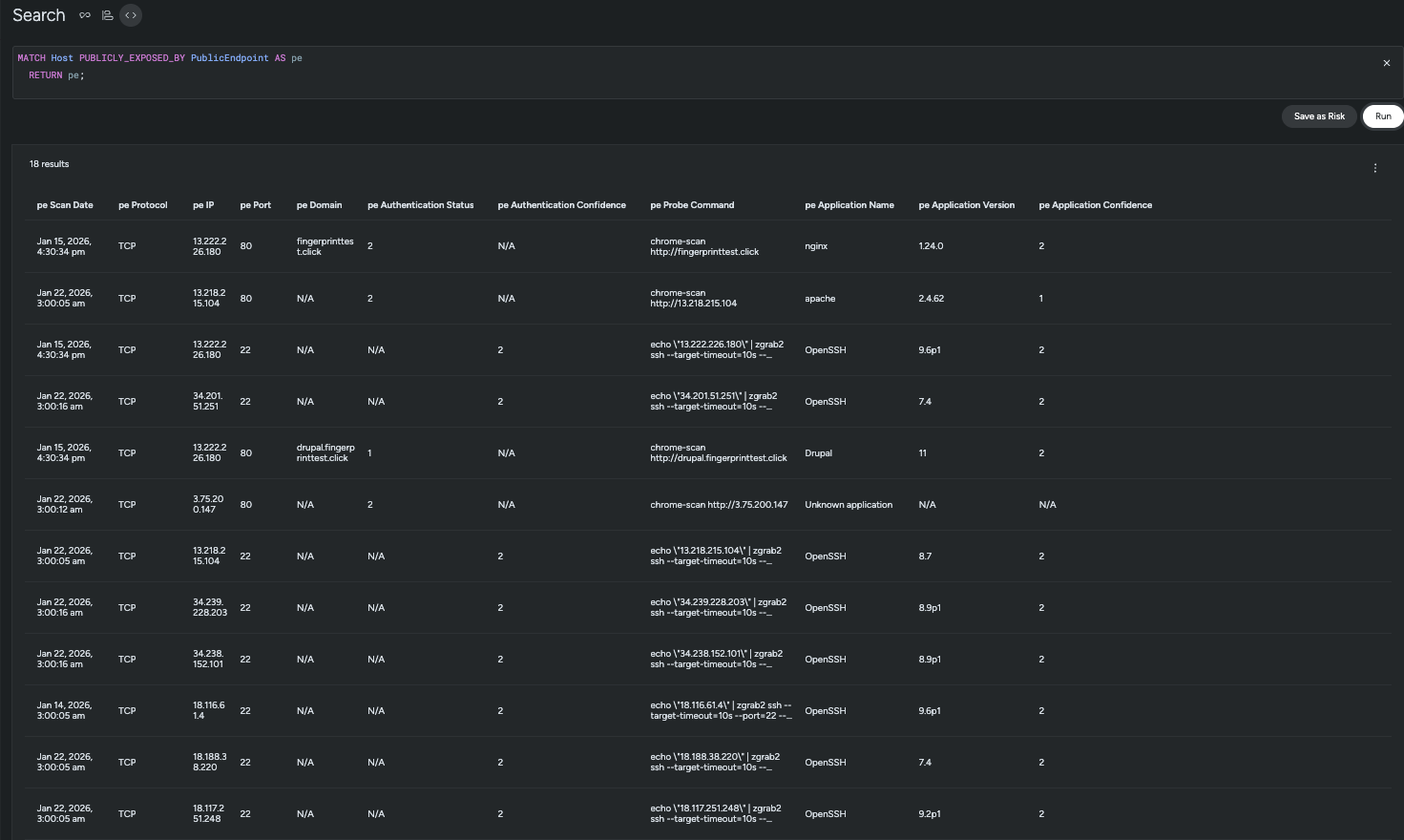
Use the following query to retrieve all public endpoints validated through port-scanning and service-fingerprinting:
This query uses the graph relationship PUBLICLY_EXPOSED_BY to find all resources that have validated exposure through port scanning. The results will show detailed information about each exposed endpoint.
Understanding Search Results
The search results table displays comprehensive information about each publicly exposed endpoint, including:
- Scan Date: When the port scan and service fingerprinting were last performed
- Protocol: The network protocol (TCP, UDP) used for the connection
- IP Address: The public IP address that was scanned and confirmed to be accessible
- Port: The specific port number found to be open
- Application Name: The identified service or application running on the port (e.g., OpenSSH, nginx, Apache)
- Application Version: The specific version of the detected service
- Authentication Status: Information about whether the endpoint had authentication enabled
- Confidence Levels: Metrics indicating the reliability of the service identification
