Manage Custom Roles
Prerequisites
Custom roles are supported in:
- Sysdig SaaS
- Sysdig On-Prem version 6.0 or later.
Understand Custom Roles
Custom roles let you grant granular access to users based on a selected set of permissions. If the default user and team roles don’t meet your organization’s needs, you can create your own custom roles.
Custom roles let you:
- Select the permissions you want users to have based on their access to resources.
- Restrict access of users to only the necessary resources.
- Assign roles to users and teams, like built-in Sysdig roles.
Custom roles follow principles similar to role-based access control (RBAC) systems.
Benefits of Using Custom Roles
Custom roles allow you to:
Give access to a specific set of predefined dashboards, while restricting users from modifying or sharing the dashboards, or viewing any additional data.
Create service accounts for Sysdig Secure that are not tied to a particular user, for use in automating your Continuous Integration and Continuous Deployment (CI/CD) pipeline.
- Give a custom set of permissions to the CI/CD account.
- Give permission to create these accounts to a certain set of users.
Identify the owner of a particular image so the security issue can be assigned to the team who owns the issue.
Create a team role that can invite users but not manage the team.
Create a Custom Role
Log in to Sysdig Monitor or Sysdig Secure as administrator.
Select Settings > Access & Secrets > Roles.
Click New Role. The New Role page is displayed.
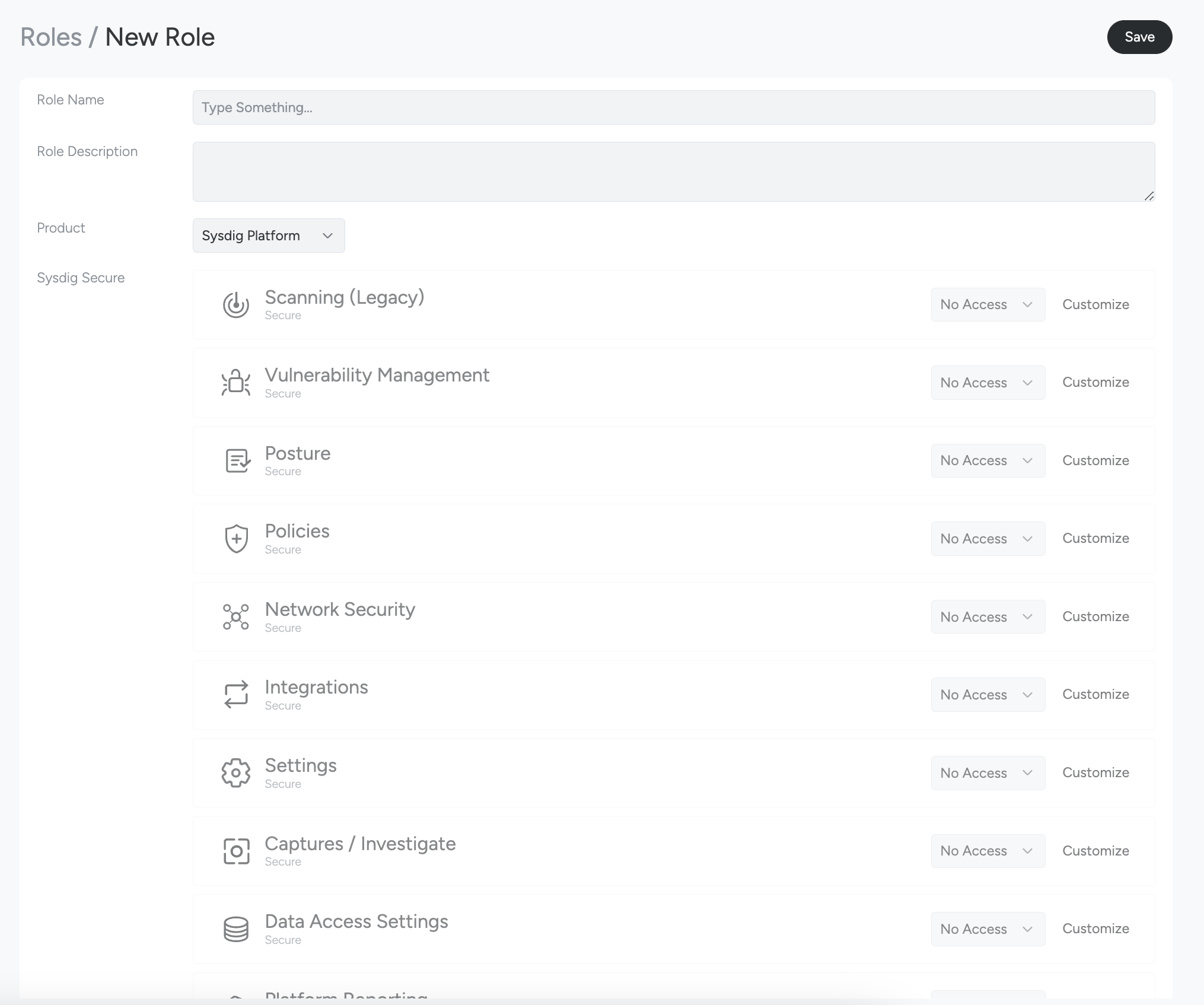
Specify the following:
- Role Name: A unique name to identify the role you create.
- Role Description: A short explanation of the role that you have created.
- Product: Choose whether the role is for Secure, Monitor, or both.
Select the features and do one of the following:
- From the drop-down, select one of the following: No Access, Read Only, Full Access, or Custom.
- Click Customize to grant granular permissions to a sub-set of features. This is an alternative to clicking Custom from the drop-down. See Custom Roles and Privileges for a detailed outline of the options.
Click Save to create the role.
Assign a Custom Role to Teams
You can set up a custom role as the default user role for teams. To do so:
Log in to Sysdig Monitor or Sysdig Secure as administrator and select Admin.
Select Teams.
Do one of the following:
- Select the relevant team from the list of teams.
- Click Add Team.
From the Default User Role drop-down, select one of the custom role you have created.
Complete creating or editing the team as described in Manage Teams and Roles.
Click Save.
Custom Roles and Privileges
When creating a custom role, you can select Customize to grant granular permissions for each product feature. The following table details the options:
Sysdig Monitor
| Category | Item | Permission | Description |
|---|---|---|---|
| Dashboards | |||
| Dashboard Metrics Data | |||
| READ | View Dashboard Metrics Data | ||
| Dashboards | |||
| READ | Access dashboards in scope of a team | ||
| EDIT | Modify dashboards in scope of a team | ||
| Automations | |||
| Automations | |||
| READ | View Automations. | ||
| Integrations | Custom Integrations | ||
| READ | Access custom integrations in spotlight | ||
| EDIT | Modify custom integrations in spotlight | ||
| Infrastructure | |||
| READ | View discovered infrastructure | ||
| Integrations | |||
| READ | View discovered workload integrations | ||
| Monitoring Integrations | |||
| EDIT | Change monitoring integration type or status | ||
| READ | View monitoring integrations. | ||
| VALIDATE | Change monitoring integration status to Pending Metrics | ||
| Spotlight | |||
| READ | Access spotlight | ||
| Sysdig Sage | |||
| Use Sysdig Sage chat | |||
| EXEC | Ability to run Sysdig Sage chat. | ||
| Advisor | |||
| Advisor | |||
| READ | Access Overview/Advisor. | ||
| Kubernetes API | |||
| READ | Access Kubernetes API. | ||
| Live Logs | |||
| VIEW | Access LiveLogs feature | ||
| Costs | |||
| Cost Advisor | |||
| EDIT | Make changes in Cost Advisor. | ||
| READ | Access Cost Advisor. | ||
| Cost Explorer | |||
| READ | Access Cost Explorer. | ||
| Cost Reports | |||
| EDIT | Edit Cost Reports. | ||
| READ | Access Cost Reports. | ||
| Explore/Metrics | |||
| Agent Console | |||
| VIEW | Use Agent Console commands | ||
| Agent Console - Agent Status | |||
| READ | Use Agent Console commands which access agent status. | ||
| Agent Console - Configuration | |||
| VIEW | Use Agent Console commands to view the configuration of the agent which does not contain sensitive information like passwords | ||
| Agent Console - Diagnostics | |||
| READ | Use Agent Console commands which access internal diagnostics of the agent | ||
| Agent Console - Network Calls | |||
| EXEC | Use Agent Console commands which make network calls to remote pods and endpoints | ||
| Agent Console - Sensitive Configuration | |||
| VIEW | Use Agent Console commands to view the configuration of the agent which does contain sensitive information like passwords. There are currently no commands that implement this permission | ||
| Explore | |||
| READ | Metric querying with Explore | ||
| EDIT | N/A | ||
| Shared Groupings with Team | |||
| TOGGLE | Share metrics grouping with the team | ||
| Alerts | |||
| Alert Events | |||
| READ | Access the events generated by triggered alerts in scope of a team | ||
| EDIT | Acknowledge an event triggered by an alert in the events feed in scope of a team | ||
| Alerts | |||
| READ | Access the alerts in scope of a team | ||
| EDIT | Modify alerts in scope of a team | ||
| Events | |||
| Custom Events | |||
| READ | Access the infrastructure & other events created by Sysdig Agent or Sysdig API | ||
| EDIT | Acknowledge the infrastructure and other events created by Sysdig Agent or Sysdig API | ||
| Captures / Investigate | |||
| Captures | |||
| VIEW | View captures in the UI | ||
| READ | Access captures | ||
| EDIT | Modify captures | ||
| Data Access Settings | |||
| Datastream | |||
| READ | Access data stream configuration | ||
| Groupings | |||
| READ | Access default and custom groupings | ||
| EDIT | Create and edit custom groupings | ||
| Ingest Platform Metrics | |||
| WRITE | N/A | ||
| Metrics Data | |||
| READ | Access metrics data | ||
| Metrics Descriptors | |||
| READ | Access metrics descriptors | ||
| PromQL Metadata | |||
| READ | Access Prometheus metrics and labels | ||
| Settings | |||
| API Access Token | |||
| VIEW | View your API token | ||
| READ | Access users API token in scope of a team | ||
| EDIT | Reset users API token in scope of a team | ||
| AWS Settings | |||
| READ | Access Amazon Web Service (AWS) settings | ||
| Agent Installation | |||
| READ | Get agent access key (required for agent installation) | ||
| Alert Downtimes | |||
| READ | List alert downtimes for the customer | ||
| Global Notification Channels | |||
| READ | Access global notification channels | ||
| Notification Channels | |||
| READ | Access notification channels in scope of a team | ||
| EDIT | Modify notification channels in scope of a team | ||
| Service Accounts | |||
| READ | Access service accounts in scope of a team | ||
| EDIT | Modify service accounts in scope of a team | ||
| Subscriptions | |||
| READ | Access customer subscription details | ||
| Sysdig Storage | |||
| READ | View Sysdig storage configuration | ||
| Team Agent Console Access Toggle | |||
| READ | See the agent console access settings for a team | ||
| EDIT | Toggle access to agent console for a team | ||
| Team Captures Access Toggle | |||
| READ | See the capture settings for a team | ||
| EDIT | Toggle access to captures for a team | ||
| Team Membership | |||
| READ | Access team members | ||
| EDIT | Modify team members | ||
| Team Membership Roles | |||
| EDIT | Modify team members role | ||
| Teams | |||
| MANAGE | Modify team settings without the ability to modify team membership for users | ||
| Users | |||
| READ | Access existing users data | ||
| CREATE | Invite new users | ||
| Users List | |||
| READ | See the list of users for a customer |
Sysdig Secure
| Category | Subcategory | Item | Permission | Description |
|---|---|---|---|---|
| Attack Surface | ||||
| Risks | ||||
| Risks | ||||
| WRITE | Ability to modify existing risks. | |||
| READ | Ability to view Risks. | |||
| Identity Findings | ||||
| CIEM | ||||
| EDIT | Ability to modify Identity Findings (CIEM), such as updating identities and creating, editing, or revoking identity exceptions. | |||
| READ | Ability to view Identity Findings (CIEM), such as identities, their permissions, and identity exceptions. | |||
| Posture Findings | ||||
| Posture Controls | ||||
| EDIT | Create and modify posture controls. | |||
| READ | View posture controls. | |||
| Vulnerability Findings | ||||
| Admission Controller (Legacy) | ||||
| EDIT | Create and modify policy mappings. | |||
| READ | Access policy mappings. | |||
| Scan Results | ||||
| READ | View scan results on the Pipeline, Runtime, and Registry UI as well as list and get results from the public API. Retrieve SBOM results from the SBOM API. | |||
| Scanning Image Results | ||||
| WRITE | Modify scanning alerts and registry credentials. | |||
| READ | Access scan results. | |||
| Registry Scanner | ||||
| EXEC | Ability to run the Registry Scanner. | |||
| CLI Execution | ||||
| EXEC | Ability to run the CLI Scanner. | |||
| Registry Credentials | ||||
| WRITE | Ability to add and modify registry credentials. | |||
| READ | Ability to list registry credentials. | |||
| Scanning Registry Credentials | ||||
| EDIT | Ability to add and modify scanning registry credentials. | |||
| READ | Ability to list scanning registry credentials. | |||
| Scanning Events (Legacy) | ||||
| CREATE | Create scanning events. | |||
| Run Scan (Legacy) | ||||
| EXEC | Execute backend scanning. | |||
| Scanning Alerts (Legacy) | ||||
| EDIT | Modify scanning alerts. | |||
| READ | Access scanning alerts. | |||
| Scanning Images (Legacy) | ||||
| READ | List scanning images. | |||
| Image Import (Legacy) | ||||
| EDIT | Import scanning images. | |||
| Query Containers (Legacy) | ||||
| EDIT | Query runtime containers API (API only, not enforced in UI). | |||
| Compliance Findings | ||||
| Compliance | ||||
| READ | Access Compliance results. | |||
| Compliance (legacy) | ||||
| READ | Access Compliance (Legacy) Results. | |||
| Benchmarks (Legacy) | ||||
| READ | Access legacy Compliance results. | |||
| Benchmark Tasks (Legacy) | ||||
| EDIT | Create and modify scheduled legacy Compliance tasks. | |||
| READ | Access scheduled legacy Compliance tasks. | |||
| Exceptions | ||||
| Risk Acceptance — Vulnerabilities | ||||
| WRITE | Create, modify, and remove exceptions. | |||
| READ | View exceptions. | |||
| Risk Acceptance — Posture / Risks / Identity | ||||
| EDIT | Accept posture, risk, and identity findings, and revoke or edit existing acceptances. | |||
| READ | Access the risk acceptances for posture, risk, and identity findings. | |||
| Vulnerability Exceptions | ||||
| EDIT | Edit vulnerability exceptions. | |||
| READ | Access vulnerability exceptions. | |||
| Trusted Images | ||||
| EDIT | Modify the trusted images list. | |||
| READ | Access the trusted images list. | |||
| Untrusted Images | ||||
| EDIT | Modify the untrusted images list. | |||
| READ | Access the untrusted images list. | |||
| Scan Now | ||||
| Scan Now | ||||
| EXEC | Ability to instantly scan by using Scan Now. | |||
| Threat Intelligence Feed | ||||
| Threat Intelligence Feed | ||||
| READ | Ability to view the Threat Intelligence Feed. | |||
| Graph Search | ||||
| Search | ||||
| VIEW | Ability to access graph search. | |||
| EXPORT | Ability to export data from graph search. | |||
| API | ||||
| READ | Ability to access SysQL API. | |||
| Detection & Response | ||||
| Events | ||||
| Secure Threats | ||||
| EDIT | Ability to modify threat events, such as editing threat exclusions. | |||
| READ | Ability to view threat events. | |||
| Policy Events | ||||
| READ | Access policy events. | |||
| Activity Audit Commands | ||||
| READ | Access activity audit commands. | |||
| Respond | ||||
| Rapid Response | ||||
| EXEC | Use rapid response. | |||
| Rapid Response Sessions | ||||
| READ | Ability to view all Rapid Response sessions. | |||
| Captures | ||||
| EDIT | Modify captures. | |||
| READ | Access captures. | |||
| VIEW | View captures in the UI. | |||
| Containment Response Actions | ||||
| EXEC | Execute Containment Response Actions. | |||
| READ | View Containment Response Actions executions, their outcomes and the artifacts produced. | |||
| Data Gathering Response Actions | ||||
| EXEC | Execute Data Gathering Response Actions. | |||
| READ | View Data Gathering Response Actions executions, their outcomes and the artifacts produced. | |||
| Inventory | ||||
| Inventory | ||||
| VIEW | Ability to access Inventory. | |||
| EXPORT | Ability to export data from Inventory. | |||
| Network Security | ||||
| READ | Access Kubernetes Network Security policy advisor. | |||
| Reporting | ||||
| Platform Reporting | ||||
| Reports | ||||
| EDIT | Ability to create and modify platform reports. | |||
| READ | Ability to view platform reports. | |||
| Report Schedules | ||||
| EDIT | Ability to create and modify platform report schedules. | |||
| READ | Ability to view platform report schedules. | |||
| Report Downloads | ||||
| READ | Ability to download generated reports. | |||
| Vulnerability Reporting (Legacy) | ||||
| VM Reporting | ||||
| WRITE | Create, modify, and delete reports. | |||
| READ | View and download scan reports. | |||
| Scanning Scheduled Reports | ||||
| EDIT | Create and modify reports. | |||
| READ | View and download existing reports. | |||
| Automations | ||||
| Automations | ||||
| EDIT | Ability to create and modify automations. | |||
| READ | Ability to view automations. | |||
| Policies | ||||
| Attack Surface Policies | ||||
| Vulnerability Policy | ||||
| WRITE | Create and edit vulnerability policies. | |||
| READ | Read vulnerability policies. | |||
| Scanning Policy (legacy) | ||||
| EDIT | Modify legacy scanning policies. | |||
| READ | Access legacy scanning policies. | |||
| Posture Policies | ||||
| EDIT | Create and modify posture policies. | |||
| READ | View posture policies. | |||
| Supply Chain Policies | ||||
| WRITE | Ability to create and modify supply chain policies. | |||
| READ | Ability to view supply chain policies. | |||
| SLA | ||||
| EDIT | Ability to create, modify, and delete SLA configurations, which define the remediation thresholds per severity and the SLA target, optionally scoped to zones. | |||
| READ | Ability to view SLA configurations. | |||
| IaC Scanning | ||||
| READ | Ability to view Infrastructure as Code (IaC) scanning results. | |||
| CLI IaC Scanning | ||||
| EXEC | Ability to run IaC scans with the CLI. | |||
| Open PR (Posture remediation) | ||||
| EDIT | Create pull requests from the posture remediation panel. | |||
| Detection & Response Policies | ||||
| Runtime Policies | ||||
| EDIT | Modify policies. | |||
| READ | Access policies. | |||
| Policy Advisor | ||||
| WRITE | Create Pod Security Policy (PSP) advisor simulation. | |||
| READ | Read PSP advisor simulations. | |||
| EXEC | Execute PSP advisor simulation. | |||
| Image Profiles | ||||
| WRITE | Write image profiles. | |||
| READ | View existing image profiles. | |||
| EXEC | Execute image profiling. | |||
| Integrations | ||||
| Environments | ||||
| Integrations | ||||
| READ | Ability to view integration providers. | |||
| Cloud Accounts | ||||
| READ | Access cloud accounts. | |||
| Third Party | ||||
| Third Party Integrations | ||||
| READ | Ability to view third party integrations. | |||
| Notification Channels | ||||
| EDIT | Modify notification channels in scope of a team. | |||
| READ | Access notification channels in scope of a team. | |||
| Global Notification Channels | ||||
| READ | Access global notification channels. | |||
| Ticketing Integration | ||||
| WRITE | Ability to create and modify ticketing integrations. | |||
| READ | Ability to view ticketing integrations. | |||
| Notification Templates | ||||
| EDIT | Ability to create and modify notification templates. | |||
| READ | Ability to view notification templates. | |||
| Remote Storage | ||||
| EDIT | Ability to edit remote storage settings. | |||
| READ | Ability to view remote storage settings. | |||
| Settings | ||||
| Users & Teams | ||||
| Users | ||||
| CREATE | Invite new users. | |||
| READ | Access existing users data. | |||
| User List | ||||
| READ | See the list of users for a customer. | |||
| Teams | ||||
| MANAGE | Modify team settings without the ability to modify team membership for users. | |||
| Team Membership | ||||
| EDIT | Modify team members. | |||
| READ | Access team members. | |||
| Team Membership Roles | ||||
| EDIT | Ability to change team member roles. | |||
| Team Captures Access | ||||
| EDIT | Toggle access to captures for a team. | |||
| READ | See the capture settings for a team. | |||
| Access & Authentication | ||||
| API Access Token | ||||
| EDIT | Reset users API token in scope of a team. | |||
| READ | Access users API token in scope of a team. | |||
| VIEW | View your API token. | |||
| Service Accounts | ||||
| EDIT | Modify service accounts in scope of a team. | |||
| READ | Access service accounts in scope of a team. | |||
| Service Account Roles | ||||
| EDIT | Ability to modify service account roles. | |||
| Service Account Notification Settings | ||||
| EDIT | Ability to modify service account notification settings. | |||
| READ | Ability to view service account notification settings. | |||
| Agents | ||||
| Agent Installation | ||||
| READ | Get agent access key (required for agent installation). | |||
| Access Keys | ||||
| READ | Ability to view team access keys. | |||
| Agent Console Access | ||||
| EDIT | Toggle access to agent console for a team. | |||
| READ | See the agent console access settings for a team. | |||
| Agent Console Commands | ||||
| VIEW | Ability to use the agent console to view agent information. | |||
| Agent Console — Agent Status | ||||
| READ | Ability to view agent status in the agent console. | |||
| Agent Console — Diagnostics | ||||
| READ | Ability to view agent internal diagnostics in the agent console. | |||
| Agent Console — Network Calls | ||||
| EXEC | Ability to run agent console commands that make network calls to remote pods and endpoints. | |||
| Agent Console — Configuration | ||||
| VIEW | Ability to view agent configuration in the agent console. | |||
| Agent Console — Sensitive Configuration | ||||
| VIEW | Ability to view sensitive agent configuration, such as passwords, in the agent console. | |||
| Platform | ||||
| Zones | ||||
| EDIT | Modify Zones. | |||
| READ | View Zones that are assigned to current team. | |||
| Events Forwarder | ||||
| READ | Access event forwarding configuration. | |||
| Secure Onboarding | ||||
| EDIT | Modify Sysdig Secure configuration. | |||
| Subscriptions | ||||
| READ | Access customer subscription details. | |||
| AWS Settings | ||||
| READ | Access Amazon Web Services (AWS) settings. | |||
| High Value Assets | ||||
| EDIT | Ability to edit high value assets. | |||
| READ | Ability to view high value assets. | |||
| S3 Capture Storage (Legacy) | ||||
| READ | View Sysdig storage configuration. | |||
| Data Access | ||||
| Metrics Data | ||||
| READ | Access metrics data. | |||
| Metrics Descriptors | ||||
| READ | Access metrics descriptors. | |||
| Groupings | ||||
| READ | Access default and custom groupings. | |||
| Sysdig Sage | ||||
| Use Sysdig Sage chat | ||||
| EXEC | Ability to use Sysdig Sage chat. | |||
| Next | ||||
| Next plans and jobs | ||||
| EDIT | Ability to create and modify Next plans and jobs. | |||
| READ | Ability to view Next plans and jobs. | |||
| Ticketing | ||||
| Tickets | ||||
| WRITE | Ability to create and modify tickets. | |||
| READ | Ability to view tickets. | |||
| DSPM | ||||
| Push DSPM findings | ||||
| SEND | Ability to push DSPM findings to Sysdig. |
